file_name <- "DataDNA Dataset Challenge - E-commerce Dataset - November 2025.xlsx"

df_events <- readxl::read_xlsx(file_name, sheet = 1)
df_products <- readxl::read_xlsx(file_name, sheet = 2)
df_customers <- readxl::read_xlsx(file_name, sheet = 3)Exploratory Data Analysis
1 Load Data
The dataset is provided in an Excel file with three sheets: events, products, and customers. We will load each sheet into a separate data frame for analysis.
2 Data Dictionary
We are provided with the data dictionary. Let’s have a look at it to understand the fields better.
data_dictionary <- readxl::read_xlsx(file_name, sheet = 4)
data_dictionary |> na.omit() |> knitr::kable()| Column | Description |
|---|---|
| customer_id | Unique ID for each customer. |
| signup_date | When the customer signed up. |
| region | State/province/region. |
| currency_preference | Preferred currency if the customer chose one. |
| segment | Customer segment (e.g., Student, SMB, Enterprise). |
| acquisition_channel | How the customer first found or was acquired by the business. |
| age_band | Age group (e.g., 18–24). |
| currency | Currency used for pricing on events. |
| country | Customer’s country. |
| country_latitude | Customer’s country centroid latitude coordinates |
| country_longitude | Customer’s country centroid longitude coordinates |
| product_id | Unique ID for each product/plan. |
| product_name | Product/plan name. |
| category | Product category (e.g., Analytics, Collaboration). |
| is_subscription | Subscription vs one-time item. |
| billing_cycle | Monthly, Annual, or One-time. |
| base_price_usd | List price in USD before discounts/taxes. |
| first_release_date | Approximate “first availability” of the product family/plan. |
| event_id | Unique ID for each transaction-like record. |
| event_type | order (new sale) or invoice (renewal/billing). |
| event_date | Timestamp when the event occurred. |
| customer_id | Customer on the event. |
| product_id | Product/plan on the event. |
| country / region | Customer location on the event. |
| channel | Sales channel (Website, Direct Sales, etc.). |
| payment_method | Payment type (Credit Card, Invoice, etc.). |
| currency | Currency used for this event. |
| fx_rate_to_usd | Conversion rate used for USD amounts. |
| quantity | Number of seats/units. |
| unit_price_local | Unit list price in local currency. |
| discount_code | Code applied to the event. |
| discount_local | Discount amount in local currency. |
| tax_local | Tax/VAT in local currency. |
| net_revenue_local | Net amount in local currency. |
| net_revenue_usd | Net amount converted to USD. |
| is_refunded | True/False if refunded. |
| refund_datetime | When refund happened. |
| refund_reason | Reason for refund. |
3 Data Glimpse
Now let’s take a quick look at the values in the fields of each dataset.
3.1 Events
df_events |> glimpse()Rows: 48,000
Columns: 23
$ event_id <chr> "DB4F1A096586", "3550A69EEA36", "0C3CAE65E90C", "7DD…
$ event_type <chr> "order", "order", "order", "invoice", "order", "orde…
$ event_date <dttm> 2024-12-09 00:11:27, 2025-08-11 21:31:03, 2025-09-3…
$ customer_id <chr> "CUST0001946", "CUST0003776", "CUST0001105", "CUST00…
$ product_id <chr> "PROD0083", "PROD0049", "PROD0075", "PROD0017", "PRO…
$ country <chr> "United States", "Australia", "Canada", "United Stat…
$ latitude <chr> "39.8283", "-25.2744", "56.1304", "39.8283", "39.828…
$ longitude <chr> "-98.5795", "133.7751", "-106.3468", "-98.5795", "-9…
$ region <chr> NA, "APAC", NA, NA, NA, NA, "APAC", "EU", NA, "LATAM…
$ channel <chr> "Website", "Website", "Website", "Partner", "Website…
$ payment_method <chr> "Credit Card", "Invoice", "Credit Card", "Credit Car…
$ currency <chr> "USD", "AUD", "USD", "USD", "USD", "USD", "AUD", "EU…
$ quantity <dbl> 3, 5, 1, 10, 3, 25, 3, 20, 1, 1, 3, 3, 10, 5, 5, 3, …
$ unit_price_local <chr> "36.7", "19.7", "20.12", "19.0", "29.38", "289.0", "…
$ discount_code <chr> "N/A", "N/A", "N/A", "N/A", "N/A", "N/A", "N/A", "N/…
$ discount_local <chr> "0.0", "0.0", "0.0", "0.0", "0.0", "0.0", "0.0", "0.…
$ tax_local <chr> "0.0", "9.85", "1.01", "0.0", "0.0", "0.0", "13.18",…
$ net_revenue_local <chr> "110.1", "108.35", "21.13", "190.0", "88.14", "7225.…
$ fx_rate_to_usd <chr> "1.0", "0.66", "1.0", "1.0", "1.0", "1.0", "0.66", "…
$ net_revenue_usd <chr> "110.1", "71.51", "21.13", "190.0", "88.14", "7225.0…
$ is_refunded <lgl> FALSE, FALSE, FALSE, FALSE, FALSE, FALSE, FALSE, FAL…
$ refund_datetime <dttm> NA, NA, NA, NA, NA, NA, NA, NA, NA, NA, NA, NA, NA,…
$ refund_reason <chr> NA, NA, NA, NA, NA, NA, NA, NA, NA, NA, NA, NA, NA, …3.2 Customers
df_customers |> glimpse()Rows: 4,000
Columns: 10
$ customer_id <chr> "CUST0000001", "CUST0000002", "CUST0000003", "CUST…
$ signup_date <dttm> 2025-07-28 15:21:00, 2024-09-01 00:03:00, 2024-06…
$ region <chr> "EU", "APAC", "EU", "APAC", NA, NA, "EU", "APAC", …
$ currency_preference <chr> "GBP", "AUD", "GBP", "AUD", "USD", "USD", "EUR", "…
$ segment <chr> "Consumer", "Consumer", "Consumer", "Consumer", "C…
$ acquisition_channel <chr> "Affiliate", "Organic", "Paid Search", "Email", "P…
$ age_band <chr> "55+", "55+", "35-44", "55+", "35-44", "25-34", "3…
$ country <chr> "United Kingdom", "Australia", "United Kingdom", "…
$ country_latitude <chr> "55.3781", "-25.2744", "55.3781", "-25.2744", "39.…
$ country_longitude <chr> "-3.436", "133.7751", "-3.436", "133.7751", "-98.5…3.3 Products
df_products |> glimpse()Rows: 101
Columns: 14
$ product_id <chr> "PROD0001", "PROD0002", "PROD0003", "PROD0004", "P…
$ product_name <chr> "Microsoft 365 Business Standard Monthly", "Micros…
$ category <chr> "Productivity Suite", "Productivity Suite", "Produ…
$ is_subscription <lgl> TRUE, TRUE, TRUE, TRUE, TRUE, TRUE, TRUE, TRUE, FA…
$ billing_cycle <chr> "Monthly", "Annual", "Monthly", "Annual", "Monthly…
$ base_price_usd <chr> "49.0", "499.0", "29.0", "299.0", "15.0", "149.0",…
$ first_release_date <dttm> 2023-11-24, 2023-02-27, 2023-01-13, 2023-05-21, 2…
$ vendor <chr> "Microsoft", "Microsoft", "Adobe", "Adobe", "AI To…
$ resale_model <chr> "Direct resale", "Direct resale", "Direct resale",…
$ brand_safe_name <chr> "Office Suite 365 Business Standard Monthly", "Off…
$ product_name_orig <chr> "Microsoft 365 Business Standard Monthly", "Micros…
$ base_price_usd_orig <chr> "49.0", "499.0", "29.0", "299.0", "15.0", "149.0",…
$ base_key <chr> "microsoft 365 business standard", "microsoft 365 …
$ product_version <chr> "v3.0", "v3.0", "v3.0", "v3.0", "v3.0", "v3.0", "v…4 Field Types
We need to set correct data type for each field.
df_events <- df_events |>
  mutate(
    event_date = as.POSIXct(event_date,
      format = "%Y-%m-%d %H:%M:%S", tz = "UTC"
    ),
    country = as.factor(country),
    region = as.factor(region),
    channel = as.factor(channel),
    payment_method = as.factor(payment_method),
    currency = as.factor(currency),
    latitude = as.numeric(latitude),
    longitude = as.numeric(longitude),
    quantity = as.numeric(quantity),
    unit_price_local = as.numeric(unit_price_local),
    discount_local = as.numeric(discount_local),
    tax_local = as.numeric(tax_local),
    net_revenue_local = as.numeric(net_revenue_local),
    fx_rate_to_usd = as.numeric(fx_rate_to_usd),
    net_revenue_usd = as.numeric(net_revenue_usd),
    refund_datetime = as.POSIXct(refund_datetime,
      format = "%Y-%m-%d %H:%M:%S", tz = "UTC"
    ),
    refund_reason = as.factor(refund_reason)
  )
df_customers <- df_customers |>
  mutate(
    signup_date = as.POSIXct(signup_date,
      format = "%Y-%m-%d %H:%M:%S", tz = "UTC"
    ),
    region = as.factor(region),
    country = as.factor(country),
    currency_preference = as.factor(currency_preference),
    segment = as.factor(segment),
    acquisition_channel = as.factor(acquisition_channel),
    age_band = factor(age_band,
      levels = c("18-24", "25-34", "35-44", "45-54", "55+")
    ),
    country = as.factor(country),
    country_latitude = as.numeric(country_latitude),
    country_longitude = as.numeric(country_longitude)
  )
df_products <- df_products |>
  mutate(
    product_name = as.factor(product_name),
    category = as.factor(category),
    billing_cycle = factor(billing_cycle,
      levels = c("One-time", "Monthly", "Annual")
    ),
    first_release_date = as.POSIXct(first_release_date,
      format = "%Y-%m-%d %H:%M:%S", tz = "UTC"
    ),
    vendor = as.factor(vendor),
    resale_model = as.factor(resale_model),
    base_price_usd_orig = as.numeric(base_price_usd_orig)
  )
5 Summary Statistics
5.1 Events
Events dataset consists of 48000 rows and 23 columns. The event_date field ranges from 2024-04-22 00:09:01 to 2025-10-21 23:56:20.
skimr::skim(df_events)| Name | df_events |
| Number of rows | 48000 |
| Number of columns | 23 |
| _______________________ | |
| Column type frequency: | |
| character | 5 |
| factor | 6 |
| logical | 1 |
| numeric | 9 |
| POSIXct | 2 |
| ________________________ | |
| Group variables | None |
Variable type: character
| skim_variable | n_missing | complete_rate | min | max | empty | n_unique | whitespace |
|---|---|---|---|---|---|---|---|
| event_id | 0 | 1 | 12 | 12 | 0 | 48000 | 0 |
| event_type | 0 | 1 | 5 | 7 | 0 | 2 | 0 |
| customer_id | 0 | 1 | 11 | 11 | 0 | 4000 | 0 |
| product_id | 0 | 1 | 8 | 8 | 0 | 101 | 0 |
| discount_code | 0 | 1 | 3 | 13 | 0 | 14 | 0 |
Variable type: factor
| skim_variable | n_missing | complete_rate | ordered | n_unique | top_counts |
|---|---|---|---|---|---|
| country | 0 | 1.00 | FALSE | 10 | Uni: 14735, Uni: 7262, Can: 4844, Aus: 4836 |
| region | 19579 | 0.59 | FALSE | 3 | EU: 19040, APA: 7306, LAT: 2075 |
| channel | 0 | 1.00 | FALSE | 5 | Web: 21549, Dir: 9792, Res: 6914, Par: 4884 |
| payment_method | 0 | 1.00 | FALSE | 4 | Cre: 26340, Inv: 12055, Pay: 7215, Wir: 2390 |
| currency | 0 | 1.00 | FALSE | 4 | USD: 24124, EUR: 11778, GBP: 7262, AUD: 4836 |
| refund_reason | 46995 | 0.02 | FALSE | 4 | Bil: 269, Acc: 265, Dup: 238, Ser: 233 |
Variable type: logical
| skim_variable | n_missing | complete_rate | mean | count |
|---|---|---|---|---|
| is_refunded | 0 | 1 | 0.02 | FAL: 46995, TRU: 1005 |
Variable type: numeric
| skim_variable | n_missing | complete_rate | mean | sd | p0 | p25 | p50 | p75 | p100 | hist |
|---|---|---|---|---|---|---|---|---|---|---|
| latitude | 0 | 1 | 35.51 | 25.61 | -25.27 | 39.83 | 39.83 | 55.38 | 56.13 | ▂▁▁▅▇ |
| longitude | 0 | 1 | -22.98 | 79.32 | -106.35 | -98.58 | -3.44 | 5.29 | 133.78 | ▇▁▇▁▃ |
| quantity | 0 | 1 | 6.03 | 6.25 | 1.00 | 1.00 | 3.00 | 10.00 | 25.00 | ▇▁▁▁▁ |
| unit_price_local | 0 | 1 | 106.67 | 113.83 | 4.10 | 15.81 | 49.00 | 186.89 | 756.06 | ▇▂▁▁▁ |
| discount_local | 0 | 1 | 26.52 | 96.08 | 0.00 | 0.00 | 0.00 | 7.34 | 2353.75 | ▇▁▁▁▁ |
| tax_local | 0 | 1 | 66.09 | 155.25 | 0.00 | 0.00 | 8.49 | 47.54 | 2353.75 | ▇▁▁▁▁ |
| net_revenue_local | 0 | 1 | 668.31 | 1214.80 | 4.00 | 55.24 | 202.79 | 675.86 | 15121.20 | ▇▁▁▁▁ |
| fx_rate_to_usd | 0 | 1 | 1.01 | 0.14 | 0.66 | 1.00 | 1.00 | 1.06 | 1.22 | ▁▁▁▇▂ |
| net_revenue_usd | 0 | 1 | 663.17 | 1188.44 | 4.00 | 54.34 | 199.71 | 675.46 | 14970.13 | ▇▁▁▁▁ |
Variable type: POSIXct
| skim_variable | n_missing | complete_rate | min | max | median | n_unique |
|---|---|---|---|---|---|---|
| event_date | 0 | 1.00 | 2024-04-22 00:09:01 | 2025-10-21 23:56:20 | 2025-01-20 11:45:33 | 47976 |
| refund_datetime | 46995 | 0.02 | 2024-04-25 21:38:12 | 2025-12-11 16:52:56 | 2025-02-23 06:50:48 | 1005 |
5.2 Impute Missing Region Values
We can see that there are 19579 rows with missing region values. Let’s check which countries these rows belong to.
df_events |>
  filter(is.na(region)) |>
  group_by(country) |>
  summarise(count = n()) |>
  arrange(desc(count))
# A tibble: 2 × 2
country count
<fct> <int>
1 United States 14735
2 Canada 4844We can impute the missing region values based on the country field since each country belongs to a specific region. Missing region values correspond to countries in North America (US, CA). Therefore, we will impute the missing region values with “NOAM”.
df_events <- df_events |>
  mutate(region = ifelse(is.na(region), "NOAM", as.character(region)))
df_events <- df_events |> mutate(region = as.factor(region))
5.3 Customers
skimr::skim(df_customers)| Name | df_customers |
| Number of rows | 4000 |
| Number of columns | 10 |
| _______________________ | |
| Column type frequency: | |
| character | 1 |
| factor | 6 |
| numeric | 2 |
| POSIXct | 1 |
| ________________________ | |
| Group variables | None |
Variable type: character
| skim_variable | n_missing | complete_rate | min | max | empty | n_unique | whitespace |
|---|---|---|---|---|---|---|---|
| customer_id | 0 | 1 | 11 | 11 | 0 | 4000 | 0 |
Variable type: factor
| skim_variable | n_missing | complete_rate | ordered | n_unique | top_counts |
|---|---|---|---|---|---|
| region | 1628 | 0.59 | FALSE | 3 | EU: 1583, APA: 617, LAT: 172 |
| currency_preference | 0 | 1.00 | FALSE | 4 | USD: 2006, EUR: 990, GBP: 593, AUD: 411 |
| segment | 0 | 1.00 | FALSE | 4 | Con: 2529, SOH: 761, SMB: 597, Ent: 113 |
| acquisition_channel | 0 | 1.00 | FALSE | 6 | Org: 1121, Pai: 869, Soc: 708, Ema: 664 |
| age_band | 0 | 1.00 | FALSE | 5 | 25-: 1425, 35-: 1099, 45-: 617, 18-: 451 |
| country | 0 | 1.00 | FALSE | 10 | Uni: 1213, Uni: 593, Can: 415, Aus: 411 |
Variable type: numeric
| skim_variable | n_missing | complete_rate | mean | sd | p0 | p25 | p50 | p75 | p100 | hist |
|---|---|---|---|---|---|---|---|---|---|---|
| country_latitude | 0 | 1 | 35.41 | 25.75 | -25.27 | 39.83 | 39.83 | 55.38 | 56.13 | ▂▁▁▅▇ |
| country_longitude | 0 | 1 | -22.61 | 79.63 | -106.35 | -98.58 | -3.44 | 5.29 | 133.78 | ▇▁▇▁▃ |
Variable type: POSIXct
| skim_variable | n_missing | complete_rate | min | max | median | n_unique |
|---|---|---|---|---|---|---|
| signup_date | 0 | 1 | 2024-01-01 05:27:00 | 2025-08-30 15:03:00 | 2024-11-04 13:14:00 | 3989 |
5.4 Impute Missing Region Values
The Customers dataset also has missing values in the region field. Let’s check which countries these rows belong to.
df_customers |>
  filter(is.na(region)) |>
  group_by(country) |>
  summarise(count = n()) |>
  arrange(desc(count))
# A tibble: 2 × 2
country count
<fct> <int>
1 United States 1213
2 Canada 415We can impute the missing region values based on the country field since each country belongs to a specific region. Missing region values correspond to countries in North America (US, CA). Therefore, we will impute the missing region values with “NOAM”.
df_customers <- df_customers |>
  mutate(region = ifelse(is.na(region), "NOAM", as.character(region)))
df_customers <- df_customers |> mutate(region = as.factor(region))
5.5 Products
skimr::skim(df_products)| Name | df_products |
| Number of rows | 101 |
| Number of columns | 14 |
| _______________________ | |
| Column type frequency: | |
| character | 6 |
| factor | 5 |
| logical | 1 |
| numeric | 1 |
| POSIXct | 1 |
| ________________________ | |
| Group variables | None |
Variable type: character
| skim_variable | n_missing | complete_rate | min | max | empty | n_unique | whitespace |
|---|---|---|---|---|---|---|---|
| product_id | 0 | 1 | 8 | 8 | 0 | 101 | 0 |
| base_price_usd | 0 | 1 | 3 | 6 | 0 | 67 | 0 |
| brand_safe_name | 0 | 1 | 20 | 51 | 0 | 101 | 0 |
| product_name_orig | 0 | 1 | 15 | 39 | 0 | 70 | 0 |
| base_key | 0 | 1 | 8 | 35 | 0 | 36 | 0 |
| product_version | 0 | 1 | 4 | 4 | 0 | 2 | 0 |
Variable type: factor
| skim_variable | n_missing | complete_rate | ordered | n_unique | top_counts |
|---|---|---|---|---|---|
| product_name | 0 | 1 | FALSE | 101 | Ado: 1, Ado: 1, Ado: 1, Ado: 1 |
| category | 0 | 1 | FALSE | 17 | Add: 12, Des: 12, Ana: 10, Dev: 10 |
| billing_cycle | 0 | 1 | FALSE | 3 | Mon: 50, Ann: 49, One: 2 |
| vendor | 0 | 1 | FALSE | 17 | Mic: 24, AI : 14, Oth: 11, Ado: 10 |
| resale_model | 0 | 1 | FALSE | 3 | Dir: 58, Mar: 28, Aff: 15 |
Variable type: logical
| skim_variable | n_missing | complete_rate | mean | count |
|---|---|---|---|---|
| is_subscription | 0 | 1 | 0.98 | TRU: 99, FAL: 2 |
Variable type: numeric
| skim_variable | n_missing | complete_rate | mean | sd | p0 | p25 | p50 | p75 | p100 | hist |
|---|---|---|---|---|---|---|---|---|---|---|
| base_price_usd_orig | 0 | 1 | 99.32 | 104.26 | 5 | 15 | 50 | 160 | 499 | ▇▃▂▁▁ |
Variable type: POSIXct
| skim_variable | n_missing | complete_rate | min | max | median | n_unique |
|---|---|---|---|---|---|---|
| first_release_date | 0 | 1 | 2023-01-13 | 2024-03-01 | 2024-02-01 | 14 |
The Products dataset has no missing values.
6 Univariate Distributions
6.1 Events Categorical Variables
# Categorical distributions
df_events |>
  select(-longitude, -latitude) |>
  select(where(is.factor)) |>
  pivot_longer(everything()) |>
  ggplot(aes(x = value)) +
  facet_wrap(~name, scales = "free", ncol = 3) +
  geom_bar(fill = "steelblue") +
  theme(axis.text.x = element_text(angle = 45, hjust = 1),
        axis.title = element_blank())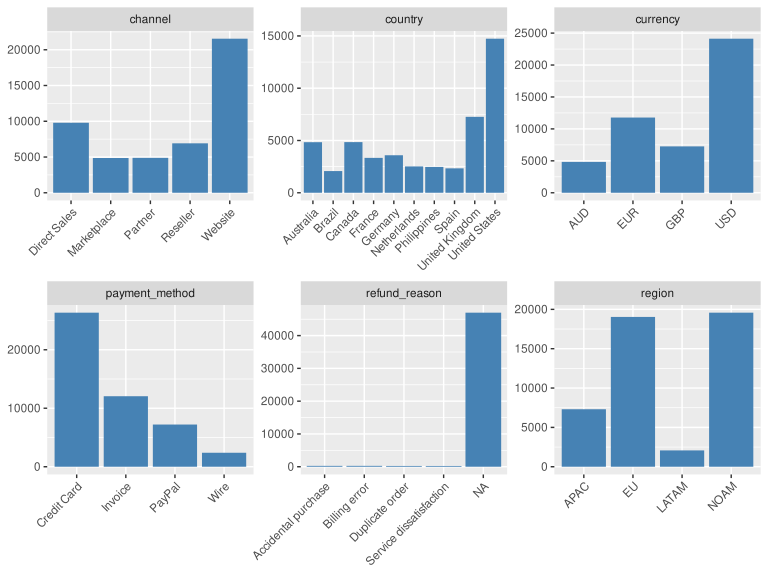
6.2 Events Numeric Variables
Before doing bivariate analysis, let’s convert local currency to USD for all relevant fields in the Events dataset.
local_fields <- df_events |>
  colnames() |>
  str_subset("_local$")

for (field in local_fields) {
  usd_field <- str_replace(field, "_local$", "_usd")
  df_events <- df_events |>
    mutate(!!sym(usd_field) := !!sym(field) / fx_rate_to_usd)
}

# Drop local currency fields
df_events <- df_events |>
  select(-all_of(local_fields))
# Numeric distributions
df_events |>
select(-longitude, -latitude) |>
select(where(is.numeric)) |>
pivot_longer(everything()) |>
ggplot(aes(x = value)) +
facet_wrap(~name, scales = "free", ncol = 3) +
geom_histogram(bins = 30, fill = "steelblue", color = "white") +
theme(axis.title = element_blank())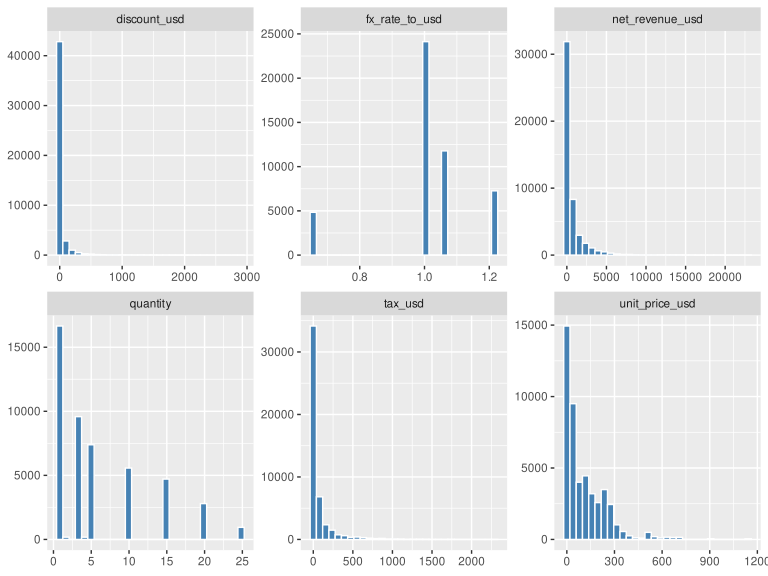
There is no need to do correlation analysis for the monetary fields.
6.3 Check Integrity of Monetary Fields
Some variables in the Events dataset need clarification:
quantity: This field represents the number of units sold in each event.unit_price_usd: This field represents the price per unit in USD.discount_usd: This field represents the discount applied in USD.tax_usd: This field represents the tax applied in USD.net_revenue_usd: This field represents the net revenue after discounts and taxes in USD.
Let’s check the integrity of these fields.
df_events <- df_events |>
  mutate(
    calculated_net_revenue = (quantity * unit_price_usd) - discount_usd +
      tax_usd
  )
integrity_issues <- df_events |>
  filter(abs(calculated_net_revenue - net_revenue_usd) > 0.01)
integrity_issues_count <- nrow(integrity_issues)
integrity_issues_count
[1] 0It seems that there are 0 rows with integrity issues in the monetary fields.
6.4 Customers Categorical Variables
# Categorical distributions
df_customers |>
  select(where(is.factor)) |>
  pivot_longer(everything()) |>
  ggplot(aes(x = value)) +
  facet_wrap(~name, scales = "free", ncol = 3) +
  geom_bar(fill = "steelblue") +
  theme(axis.text.x = element_text(angle = 45, hjust = 1),
        axis.title = element_blank())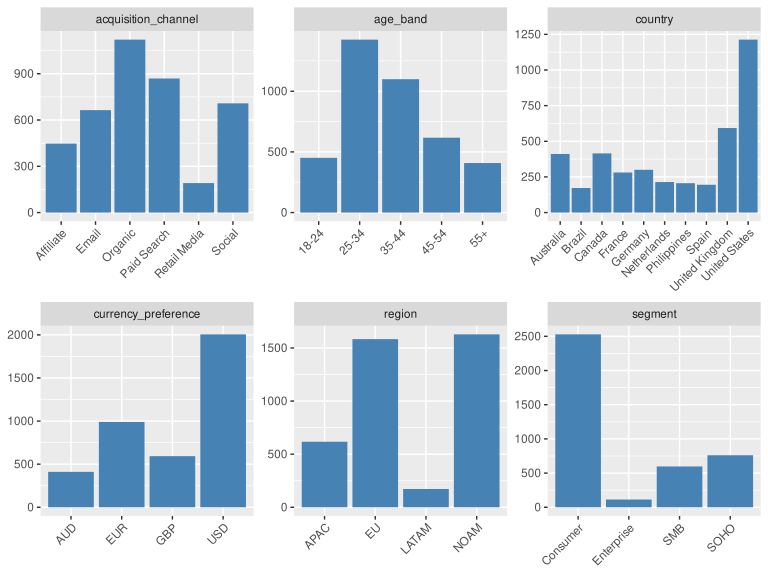
6.5 Customers Numeric Variables
Only country_latitude and country_longitude are numeric variables in the Customers dataset. We are not going to do correlation analysis for these fields.
6.6 Products Categorical Variables
# Categorical distributions
df_products |>
  select(where(is.factor)) |>
  select(-product_name) |>
  pivot_longer(everything()) |>
  ggplot(aes(x = value)) +
  facet_wrap(~name, scales = "free", ncol = 2) +
  geom_bar(fill = "steelblue") +
  theme(axis.text.x = element_text(angle = 45, hjust = 1),
        axis.title = element_blank())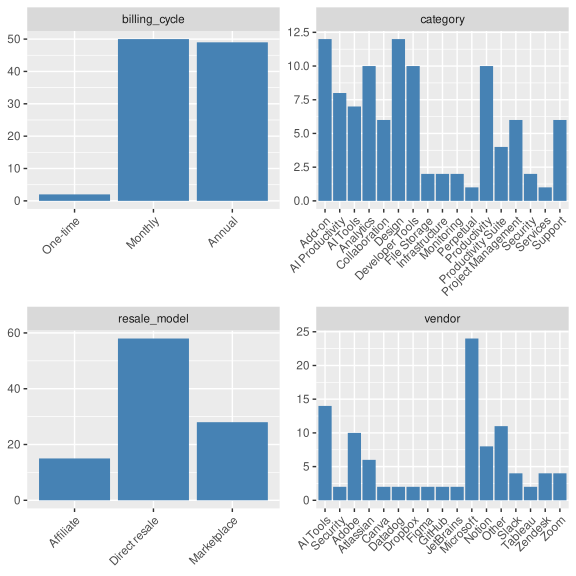
6.7 Products Numeric Variables
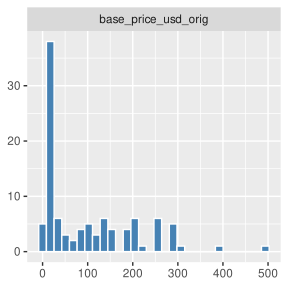
There is only one numeric variable in the Products dataset: base_price_usd_orig. We will plot its distribution.
# Numeric distributions
df_products |>
  select(where(is.numeric)) |>
  pivot_longer(everything()) |>
  ggplot(aes(x = value)) +
  facet_wrap(~name, scales = "free", ncol = 1) +
  geom_histogram(bins = 30, fill = "steelblue", color = "white") +
  theme(axis.title = element_blank())