Data Preprocessing in Power Query

Author

Aleksei Prishchepo

Published

November 16, 2025

1 Events

In this section we will create the data preprocessing steps for the Events table in Power Query. First we need to load the data. In Power Query the data is loaded from the Excel file directly and stored in the dataset variable.

file_name <- "DataDNA Dataset Challenge - E-commerce Dataset - November 2025.xlsx"

dataset <- readxl::read_xlsx(file_name, sheet = 1)
dataset <- dataset |>
  mutate(
    event_date = format(event_date, "%d.%m.%Y %H:%M:%S", tz = "UTC"),
    refund_datetime = format(refund_datetime, "%d.%m.%Y %H:%M:%S", tz = "UTC")
  )
dataset |> head()
# A tibble: 6 × 23
  event_id     event_type event_date     customer_id product_id country latitude
  <chr>        <chr>      <chr>          <chr>       <chr>      <chr>   <chr>   
1 DB4F1A096586 order      09.12.2024 00… CUST0001946 PROD0083   United… 39.8283 
2 3550A69EEA36 order      11.08.2025 21… CUST0003776 PROD0049   Austra… -25.2744
3 0C3CAE65E90C order      30.09.2025 15… CUST0001105 PROD0075   Canada  56.1304 
4 7DDC83355865 invoice    26.09.2024 04… CUST0003164 PROD0017   United… 39.8283 
5 DAE0B37D8815 order      23.06.2024 16… CUST0003410 PROD0099   United… 39.8283 
6 E3F98CFBAF5C order      18.03.2025 12… CUST0001294 PROD0026   United… 39.8283 
# ℹ 16 more variables: longitude <chr>, region <chr>, channel <chr>,
#   payment_method <chr>, currency <chr>, quantity <dbl>,
#   unit_price_local <chr>, discount_code <chr>, discount_local <chr>,
#   tax_local <chr>, net_revenue_local <chr>, fx_rate_to_usd <chr>,
#   net_revenue_usd <chr>, is_refunded <lgl>, refund_datetime <chr>,
#   refund_reason <chr>

Next chunk will contain the R code for preprocessing the Events table.

library(tidyverse)
library(dplyr)
library(tidyr)

# Set correct data types
dataset <- dataset |>
  mutate(
    event_date = as.POSIXct(event_date,
      format = "%d.%m.%Y %H:%M:%S", tz = "UTC"
    ),
    refund_datetime = as.POSIXct(refund_datetime,
      format = "%d.%m.%Y %H:%M:%S", tz = "UTC"
    ),
    `Date` = as.Date(event_date),
    latitude = as.numeric(latitude),
    longitude = as.numeric(longitude),
    quantity = as.numeric(quantity),
    unit_price_local = as.numeric(unit_price_local),
    discount_local = as.numeric(discount_local),
    tax_local = as.numeric(tax_local),
    net_revenue_local = as.numeric(net_revenue_local),
    fx_rate_to_usd = as.numeric(fx_rate_to_usd),
    net_revenue_usd = as.numeric(net_revenue_usd)
  )

# Handle missing values
dataset <- dataset |>
  mutate(region = ifelse(is.na(region) |
    length(region) == 0, "NOAM", as.character(region)))
dataset <- dataset |> mutate(region = as.factor(region))

# Convert currency to USD
local_fields <- dataset |>
  colnames() |>
  str_subset("_local$")

for (field in local_fields) {
  usd_field <- str_replace(field, "_local$", "_usd")
  dataset <- dataset |>
    mutate(!!sym(usd_field) := !!sym(field) / fx_rate_to_usd)
}

# Sequence number of purchases per customer
dataset <- dataset |>
  arrange(customer_id, event_date) |>
  group_by(customer_id) |>
  mutate(purchase_sequence = row_number()) |>
  ungroup()

# Time to Second Purchase
dataset <- dataset |>
  arrange(customer_id, event_date) |>
  group_by(customer_id) |>
  mutate(
    time_to_second_purchase =
      ifelse(
        purchase_sequence == 2,
        as.numeric(difftime(event_date, lag(event_date), units = "days")),
        NA_real_
      )
  ) |>
  ungroup()

# Time Between Purchases
dataset <- dataset |>
  arrange(customer_id, event_date) |>
  group_by(customer_id) |>
  mutate(
    time_between_purchases =
      ifelse(
        purchase_sequence > 1,
        as.numeric(difftime(event_date, lag(event_date), units = "days")),
        NA_real_
      )
  ) |>
  ungroup()

# Time Before Refund
dataset <- dataset |>
  mutate(
    time_to_refund = as.numeric(difftime(refund_datetime,
      event_date,
      units = "days"
    )),
  )

# Drop local currency fields
dataset <- dataset |>
  select(-all_of(local_fields))

output <- dataset |> mutate(
    event_date = format(event_date, "%d.%m.%Y %H:%M:%S", tz = "UTC"),
    refund_datetime = format(refund_datetime, "%d.%m.%Y %H:%M:%S", tz = "UTC") 
  )

output |> head()
# A tibble: 6 × 27
  event_id     event_type event_date     customer_id product_id country latitude
  <chr>        <chr>      <chr>          <chr>       <chr>      <chr>      <dbl>
1 ABFBC39EA034 order      13.06.2024 05… CUST0000001 PROD0094   United…     55.4
2 9EC5B0C5C929 order      04.07.2024 02… CUST0000001 PROD0085   United…     55.4
3 11E3C1E01029 order      15.07.2024 00… CUST0000001 PROD0002   United…     55.4
4 D4FCA1E09F5A invoice    28.08.2024 03… CUST0000001 PROD0050   United…     55.4
5 DBDD8553C42E order      29.08.2024 11… CUST0000001 PROD0096   United…     55.4
6 FC502C56485A invoice    16.10.2024 18… CUST0000001 PROD0097   United…     55.4
# ℹ 20 more variables: longitude <dbl>, region <fct>, channel <chr>,
#   payment_method <chr>, currency <chr>, quantity <dbl>, discount_code <chr>,
#   fx_rate_to_usd <dbl>, net_revenue_usd <dbl>, is_refunded <lgl>,
#   refund_datetime <chr>, refund_reason <chr>, Date <date>,
#   unit_price_usd <dbl>, discount_usd <dbl>, tax_usd <dbl>,
#   purchase_sequence <int>, time_to_second_purchase <dbl>,
#   time_between_purchases <dbl>, time_to_refund <dbl>
# Save events to csv
output |> write.csv("Events.csv", row.names = FALSE)

2 RFM Segmentation

Here is the R code for RFM analysis that can be implemented in Power Query.

First, we load the preprocessed Events table from the previous step to the dataset variable. In Power Query this will be done by referencing the Events table.

# Read back the csv file
dataset <- read.csv("Events.csv")

Next chunk will contain the R code for RFM analysis.

library(lubridate)
library(dplyr)
# Assuming 'dataset' is the preprocessed Events table
dataset <- dataset |>
  mutate(event_date = as.POSIXct(event_date,
    format = "%d.%m.%Y %H:%M:%S", tz = "UTC"
  ))
# Define the reference date as the latest event date in the dataset
lastest_date <- max(dataset$event_date, na.rm = TRUE)

output <- dataset |>
  group_by(customer_id) |>
  summarise(
    Recency = as.numeric(difftime(lastest_date,
      max(event_date),
      units = "days"
    )),
    Frequency = n_distinct(event_id),
    Monetary = sum(net_revenue_usd, na.rm = TRUE)
  ) |>
  ungroup()
# Calculate RFM scores
output <- output |>
  mutate(
    R_Score = ntile(-Recency, 5),
    F_Score = ntile(Frequency, 5),
    M_Score = ntile(Monetary, 5),
    RFM_Score = paste0(R_Score, F_Score, M_Score),
    RFM_Sum = R_Score + F_Score + M_Score
  )

output <- output |>
  mutate(
    RFM_Level = case_when(
      R_Score >= 4 & F_Score >= 4 & M_Score >= 4 ~ "Champions",
      R_Score >= 4 & F_Score >= 3 ~ "Loyal Customers",
      R_Score >= 4 & F_Score <= 2 ~ "New Customers",
      R_Score == 3 & F_Score >= 3 ~ "Potential Loyalists",
      R_Score == 3 & F_Score <= 2 ~ "Promising",
      R_Score == 2 & F_Score >= 4 ~ "Needs Attention",
      R_Score <= 2 & F_Score >= 4 ~ "Cannot Lose Them",
      R_Score <= 2 & F_Score == 3 ~ "At Risk",
      TRUE ~ "Hibernating"
    )
  )

output |> head()
# A tibble: 6 × 10
  customer_id Recency Frequency Monetary R_Score F_Score M_Score RFM_Score
  <chr>         <dbl>     <int>    <dbl>   <int>   <int>   <int> <chr>    
1 CUST0000001    1.85        11    8717.       5       2       4 524      
2 CUST0000002    1.03        14    8068.       5       4       3 543      
3 CUST0000003   12.3         10   11522.       4       2       4 424      
4 CUST0000004   20.9         17   29824.       4       5       5 455      
5 CUST0000005  191.          10    2428.       1       2       1 121      
6 CUST0000006   35.2         14   14167.       3       4       5 345      
# ℹ 2 more variables: RFM_Sum <int>, RFM_Level <chr>

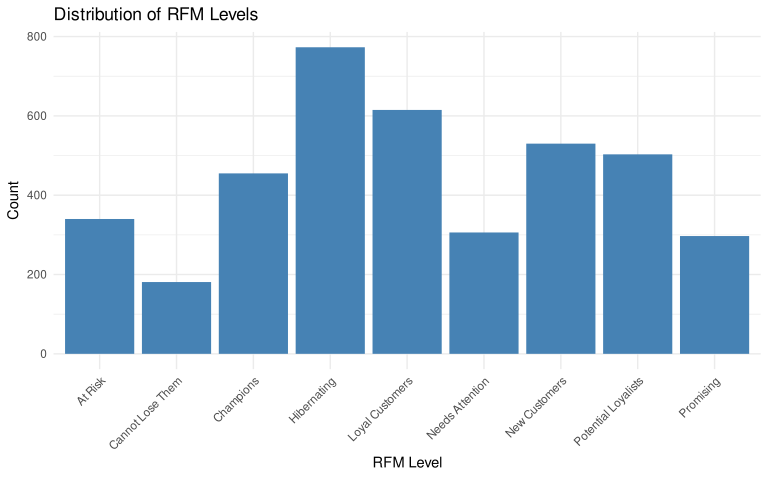
Let’s check the distribution of RFM Levels.

library(ggplot2)
ggplot(output, aes(x = RFM_Level)) +
  geom_bar(fill = "steelblue") +
  theme_minimal() +
  labs(title = "Distribution of RFM Levels", x = "RFM Level", y = "Count") +
  theme(axis.text.x = element_text(angle = 45, hjust = 1))

3 ABC/XYZ Segmentation

Here is the R code for ABC/XYZ analysis that can be implemented in Power Query.

First, we store the preprocessed Events table from the previous step in the dataset variable. In Power Query this will be done by referencing the Events table.

dataset <- read.csv("Events.csv")

Next chunk will contain the R code for ABC/XYZ analysis.

library(dplyr)
library(tidyr)

# Assuming 'dataset' is the preprocessed Events table
dataset <- dataset |>
  mutate(event_date = as.POSIXct(event_date,
    format = "%d.%m.%Y %H:%M:%S", tz = "UTC"
  ))
# Define the reference date as the latest event date in the dataset
lastest_date <- max(dataset$event_date, na.rm = TRUE)
output <- dataset |>
  group_by(product_id) |>
  summarise(
    Total_Sales = sum(net_revenue_usd, na.rm = TRUE),
    Avg_Sales = mean(net_revenue_usd, na.rm = TRUE),
    SD_Sales = sd(net_revenue_usd, na.rm = TRUE),
    CoV = ifelse(Avg_Sales != 0, SD_Sales / Avg_Sales, 0)
  ) |>
  ungroup()

# ABC Classification based on Total Sales
output <- output |>
  arrange(desc(Total_Sales)) |>
  mutate(
    Cumulative_Sales = cumsum(Total_Sales),
    Total_Sales_Sum = sum(Total_Sales),
    Sales_Percent = Cumulative_Sales / Total_Sales_Sum,
    ABC_Class = case_when(
      Sales_Percent <= 0.8 ~ "A",
      Sales_Percent <= 0.95 ~ "B",
      TRUE ~ "C"
    )
  ) |>
  select(-Cumulative_Sales, -Total_Sales_Sum, -Sales_Percent)

# XYZ Classification based on Coefficient of Variation
set.seed(123)
km <- kmeans(output$CoV, centers = 3)

output$XYZ_Class <- c("X", "Y", "Z")[km$cluster]

means <- tapply(output$CoV, km$cluster, mean)
mapping <- order(means)
output$XYZ_Class <- c("X", "Y", "Z")[mapping[km$cluster]]


output <- output |>
  mutate(ABC_XYZ_Class = paste0(ABC_Class, XYZ_Class))

output |> head()
# A tibble: 6 × 8
  product_id Total_Sales Avg_Sales SD_Sales   CoV ABC_Class XYZ_Class
  <chr>            <dbl>     <dbl>    <dbl> <dbl> <chr>     <chr>    
1 PROD0002      1643363.     3395.    3538.  1.04 A         Y        
2 PROD0100       989869.     2106.    2473.  1.17 A         Y        
3 PROD0078       962684.     2044.    2414.  1.18 A         Y        
4 PROD0004       962662.     2057.    2850.  1.39 A         Z        
5 PROD0054       959471.     2020.    2521.  1.25 A         Z        
6 PROD0076       959272.     2050.    2470.  1.20 A         Z        
# ℹ 1 more variable: ABC_XYZ_Class <chr>
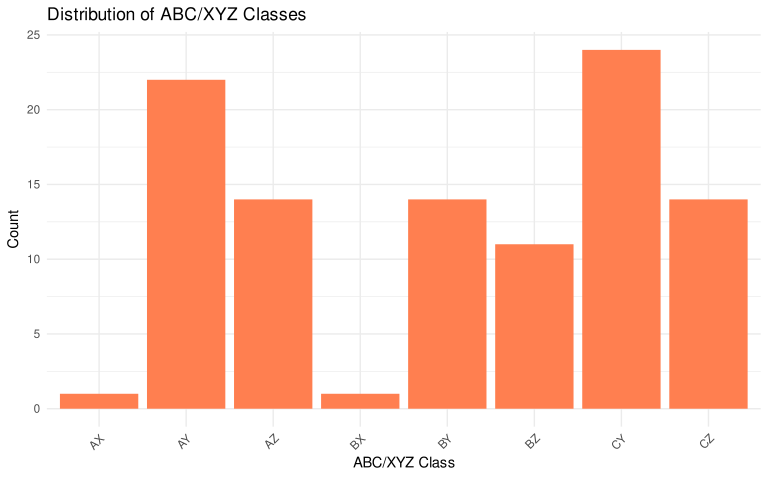
Let’s check the distribution of ABC/XYZ Classes.

library(ggplot2)
ggplot(output, aes(x = ABC_XYZ_Class)) +
  geom_bar(fill = "coral") +
  theme_minimal() +
  labs(
    title = "Distribution of ABC/XYZ Classes",
    x = "ABC/XYZ Class", y = "Count"
  ) +
  theme(axis.text.x = element_text(angle = 45, hjust = 1))

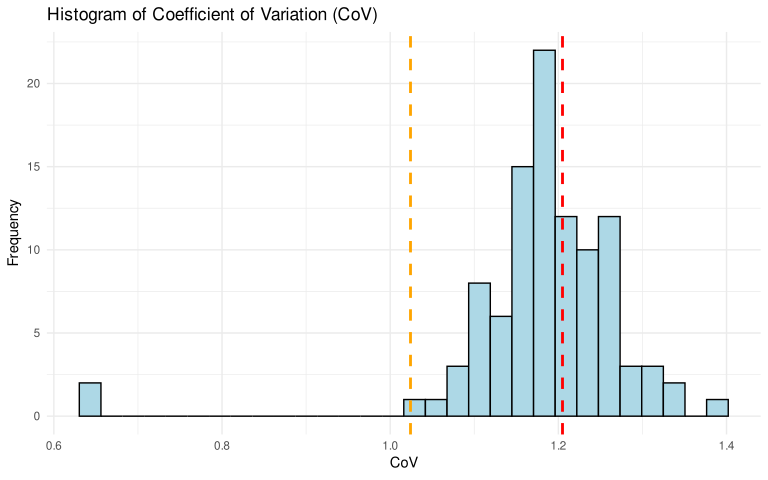
Let’s visualize the distribution of Coefficient of Variation (CoV) with thresholds for Y and Z classes.

Y_threshold <- output[output$XYZ_Class == "Y", "CoV"] |> min(na.rm = TRUE)
Z_threshold <- output[output$XYZ_Class == "Z", "CoV"] |> min(na.rm = TRUE)

output |> ggplot(aes(x = CoV)) +
  geom_histogram(bins = 30, fill = "lightblue", color = "black") +
  labs(
    title = "Histogram of Coefficient of Variation (CoV)",
    x = "CoV", y = "Frequency"
  ) +
  geom_vline(
    xintercept = Y_threshold, color = "orange",
    linetype = "dashed", size = 1
  ) +
  geom_vline(
    xintercept = Z_threshold, color = "red",
    linetype = "dashed", size = 1
  ) +
  theme_minimal()

XYZ classes separation looks plausible, so we may proceed adding the code to Power Query.

4 Customers

Let’s create the data preprocessing steps for the Customers table in Power Query.

dataset <- readxl::read_xlsx(file_name, sheet = 3)

Next chunk will contain the R code for preprocessing the Customers table.

library(tidyverse)
library(dplyr)
library(tidyr)

# Handle missing values
dataset <- dataset |>
  mutate(region = ifelse(is.na(region) |
    length(region) == 0, "NOAM", as.character(region)))
output <- dataset |> mutate(region = as.factor(region))

5 Products

We don’t need to do any preprocessing for the Products table as all fields are already in correct format and there are no missing values.

6 References