Time Series Forecasts

Author

Aleksei Prishchepo

Published

November 16, 2025

In this notebook we’re going to create forecasts for the time series data.

1 Load Data

In Power BI we will reference the Events table. Here we will load the data from a CSV file.

library(readr)
library(dplyr)

dataset <- read_csv("Events.csv")
dataset <- dataset |>
  mutate(Date = format(as.Date(Date), "%d.%m.%Y"))
dataset |> glimpse()
Rows: 48,000
Columns: 27
$ event_id                <chr> "ABFBC39EA034", "9EC5B0C5C929", "11E3C1E01029"…
$ event_type              <chr> "order", "order", "order", "invoice", "order",…
$ event_date              <chr> "13.06.2024 05:22:41", "04.07.2024 02:06:29", …
$ customer_id             <chr> "CUST0000001", "CUST0000001", "CUST0000001", "…
$ product_id              <chr> "PROD0094", "PROD0085", "PROD0002", "PROD0050"…
$ country                 <chr> "United Kingdom", "United Kingdom", "United Ki…
$ latitude                <dbl> 55.3781, 55.3781, 55.3781, 55.3781, 55.3781, 5…
$ longitude               <dbl> -3.4360, -3.4360, -3.4360, -3.4360, -3.4360, -…
$ region                  <chr> "EU", "EU", "EU", "EU", "EU", "EU", "EU", "EU"…
$ channel                 <chr> "Direct Sales", "Website", "Reseller", "Market…
$ payment_method          <chr> "Credit Card", "Invoice", "Invoice", "Credit C…
$ currency                <chr> "GBP", "GBP", "GBP", "GBP", "GBP", "GBP", "GBP…
$ quantity                <dbl> 1, 1, 1, 15, 15, 15, 3, 1, 25, 5, 1, 1, 20, 3,…
$ discount_code           <chr> "N/A", "N/A", "N/A", "N/A", "SAVE5", "BFCM10",…
$ fx_rate_to_usd          <dbl> 1.22, 1.22, 1.22, 1.22, 1.22, 1.22, 1.22, 1.22…
$ net_revenue_usd         <dbl> 189.426230, 9.991803, 402.311475, 1572.196721,…
$ is_refunded             <lgl> FALSE, FALSE, FALSE, FALSE, FALSE, FALSE, FALS…
$ refund_datetime         <chr> NA, NA, NA, NA, NA, NA, NA, NA, NA, NA, NA, NA…
$ refund_reason           <chr> NA, NA, NA, NA, NA, NA, NA, NA, NA, NA, NA, NA…
$ Date                    <chr> "13.06.2024", "04.07.2024", "15.07.2024", "28.…
$ unit_price_usd          <dbl> 157.852459, 8.327869, 335.262295, 87.344262, 1…
$ discount_usd            <dbl> 0.000000, 0.000000, 0.000000, 0.000000, 134.74…
$ tax_usd                 <dbl> 31.573770, 1.663934, 67.049180, 262.032787, 53…
$ purchase_sequence       <dbl> 1, 2, 3, 4, 5, 6, 7, 8, 9, 10, 11, 1, 2, 3, 4,…
$ time_to_second_purchase <dbl> NA, 20.86375, NA, NA, NA, NA, NA, NA, NA, NA, …
$ time_between_purchases  <dbl> NA, 20.863750, 10.940058, 44.105428, 1.342627,…
$ time_to_refund          <dbl> NA, NA, NA, NA, NA, NA, NA, NA, NA, NA, NA, NA…
2 Forecast by Country

library(dplyr)
library(lubridate)
library(forecast)

dataset <- dataset |> rename(ds = Date)
dataset$ds <- as.Date(dataset$ds, format = "%d.%m.%Y")

earliest_date <- min(dataset$ds)
latest_date <- max(dataset$ds)

end_of_year <- as.Date(paste0(year(latest_date), "-12-31"))

# Forecast horizon in days
h_days <- difftime(end_of_year, latest_date, units = "days") |> as.numeric()

# Aggregate by ds and country
daily <- dataset |>
  group_by(country, ds) |>
  summarise(revenue = sum(net_revenue_usd), .groups = "drop")

# Define modeling function for each country
forecast_country <- function(df) {
  country_name <- unique(df$country)

  # Fill missing dates for this country
  all_days <- tibble(ds = seq(earliest_date, latest_date, by = "day"))
  df_full <- all_days |>
    left_join(df, by = "ds") |>
    mutate(
      country = country_name,
      revenue = ifelse(is.na(revenue), 0, revenue)
    )

  # Skip if too few data points
  if (nrow(df_full) < 100) {
    return(
      tibble(
        country = country_name,
        ds = df_full$ds,
        actual = df_full$revenue,
        forecast = NA_real_,
        lower95 = NA_real_,
        upper95 = NA_real_
      )
    )
  }

  # Convert to daily time series
  ts_data <- ts(df_full$revenue, frequency = 7) # weekly cycle assumed

  # Fit model
  model <- auto.arima(ts_data)
  # model <- tbats(ts_data)

  fc <- forecast(model, h = h_days)

  # Combine historical and forecasted
  result <- tibble(
    country = country_name,
    ds = seq(earliest_date, by = "day", length.out = length(ts_data) + h_days),
    actual = c(df_full$revenue, rep(NA, h_days)),
    forecast = c(rep(NA, length(ts_data)), as.numeric(fc$mean)),
    lower95 = c(rep(NA, length(ts_data)), fc$lower[, 2]),
    upper95 = c(rep(NA, length(ts_data)), fc$upper[, 2])
  )
  return(result)
}

output <- daily |>
  group_by(country) |>
  group_modify(~ forecast_country(.x)) |>
  ungroup()

# Add rolling mean for smoother actual trend line
output <- output |>
  group_by(country) |>
  arrange(ds) |>
  mutate(
    actual_ma = zoo::rollmean(actual, k = 90, fill = NA, align = "right")
  ) |>
  ungroup()

output <- output |> rename(Date = ds)

output |> tail()
# A tibble: 6 × 7
  country        Date       actual forecast lower95 upper95 actual_ma
  <chr>          <date>      <dbl>    <dbl>   <dbl>   <dbl>     <dbl>
1 Germany        2025-12-31     NA    4361.  -2588.  11310.        NA
2 Netherlands    2025-12-31     NA    2961.  -2704.   8626.        NA
3 Philippines    2025-12-31     NA    3071.  -2748.   8890.        NA
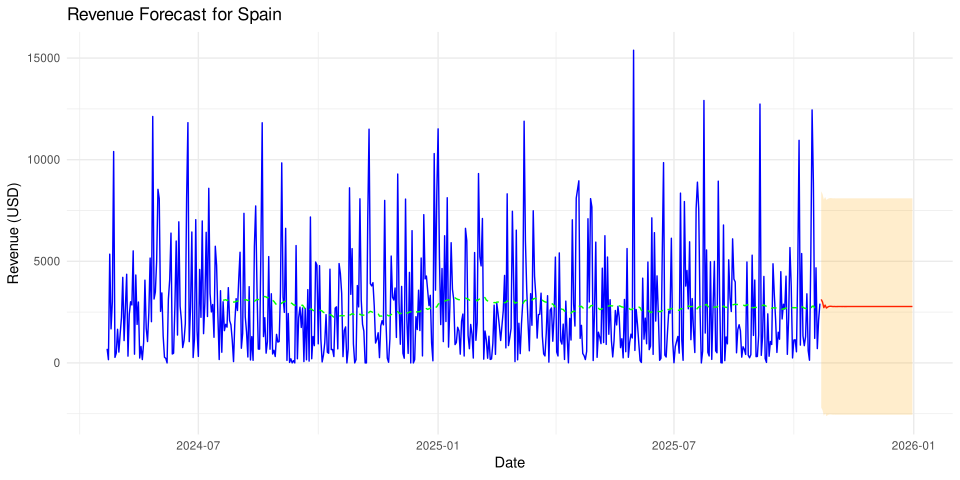
4 Spain          2025-12-31     NA    2775.  -2549.   8099.        NA
5 United Kingdom 2025-12-31     NA    6173.   -246.  12593.        NA
6 United States  2025-12-31     NA   16711.   4304.  29119.        NA

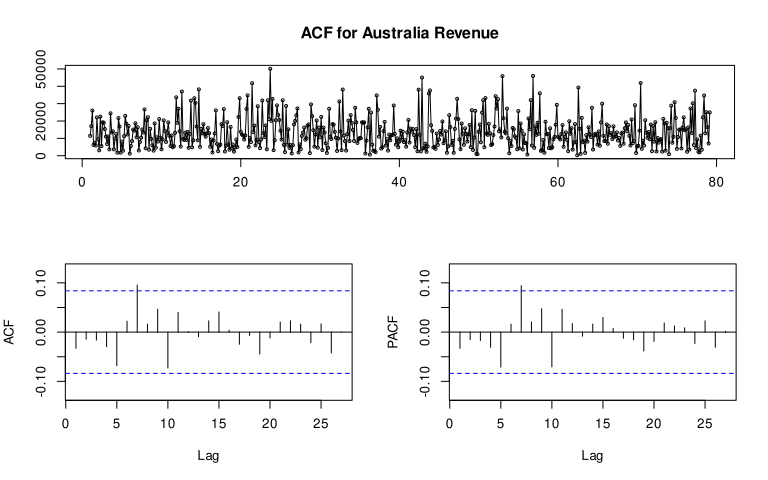
Plot ACF/PACF

library(forecast)
tsdisplay(ts(daily |> filter(country == "Australia") |> pull(revenue), frequency = 7), main = "ACF for Australia Revenue")

Plot the results for a sample country.

library(ggplot2)

sample_country <- "Spain"
df_plot <- output |> filter(country == sample_country)
ggplot(df_plot, aes(x = Date)) +
  geom_line(aes(y = actual), color = "blue") +
  geom_line(aes(y = forecast), color = "red") +
  geom_line(aes(y = actual_ma), color = "green", linetype = "dashed") +
  geom_ribbon(aes(ymin = lower95, ymax = upper95), alpha = 0.2, fill = "orange") +
  labs(
    title = paste("Revenue Forecast for", sample_country),
    y = "Revenue (USD)",
    x = "Date"
  ) +
  theme_minimal()
Figure 1

3 Forecast by Channel

here we repeat the same process but group by sales channel.

dataset <- read_csv("Events.csv")
dataset <- dataset |>
  mutate(Date = format(as.Date(Date), "%d.%m.%Y"))
library(dplyr)
library(lubridate)
library(forecast)

dataset <- dataset |> rename(ds = Date)
dataset$ds <- as.Date(dataset$ds, format = "%d.%m.%Y")

earliest_date <- min(dataset$ds)
latest_date <- max(dataset$ds)

end_of_year <- as.Date(paste0(year(latest_date), "-12-31"))

# Forecast horizon in days
h_days <- difftime(end_of_year, latest_date, units = "days") |> as.numeric()

# Aggregate by ds and channel
daily <- dataset |>
  group_by(channel, ds) |>
  summarise(revenue = sum(net_revenue_usd), .groups = "drop")

# Define modeling function for each country
forecast_channel <- function(df) {
  channel_name <- unique(df$channel)

  # Fill missing dates for this country
  all_days <- tibble(ds = seq(earliest_date, latest_date, by = "day"))
  df_full <- all_days |>
    left_join(df, by = "ds") |>
    mutate(
      channel = channel_name,
      revenue = ifelse(is.na(revenue), 0, revenue)
    )

  # Skip if too few data points
  if (nrow(df_full) < 100) {
    return(
      tibble(
        channel = channel_name,
        ds = df_full$ds,
        actual = df_full$revenue,
        forecast = NA_real_,
        lower95 = NA_real_,
        upper95 = NA_real_
      )
    )
  }

  # Convert to daily time series
  ts_data <- ts(df_full$revenue, frequency = 7) # weekly cycle assumed

  # Fit model
  model <- auto.arima(ts_data)
  # model <- tbats(ts_data)

  fc <- forecast(model, h = h_days)

  # Combine historical and forecasted
  result <- tibble(
    channel = channel_name,
    ds = seq(earliest_date, by = "day", length.out = length(ts_data) + h_days),
    actual = c(df_full$revenue, rep(NA, h_days)),
    forecast = c(rep(NA, length(ts_data)), as.numeric(fc$mean)),
    lower95 = c(rep(NA, length(ts_data)), fc$lower[, 2]),
    upper95 = c(rep(NA, length(ts_data)), fc$upper[, 2])
  )
  return(result)
}

output <- daily |>
  group_by(channel) |>
  group_modify(~ forecast_channel(.x)) |>
  ungroup()

# Add rolling mean for smoother actual trend line
output <- output |>
  group_by(channel) |>
  arrange(ds) |>
  mutate(
    actual_ma = zoo::rollmean(actual, k = 90, fill = NA, align = "right")
  ) |>
  ungroup()

output <- output |> rename(Date = ds)

output |> tail()
# A tibble: 6 × 7
  channel      Date       actual forecast lower95 upper95 actual_ma
  <chr>        <date>      <dbl>    <dbl>   <dbl>   <dbl>     <dbl>
1 Website      2025-12-30     NA   28400.   9510.  47291.        NA
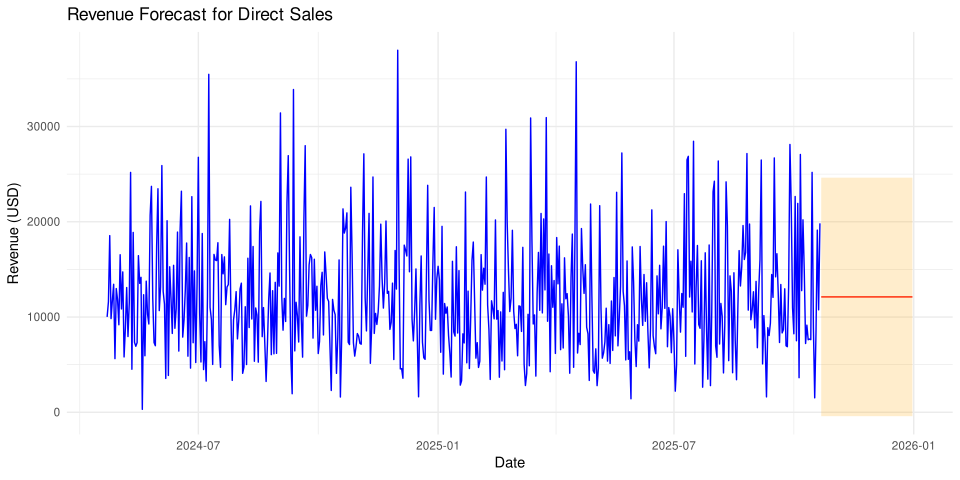
2 Direct Sales 2025-12-31     NA   12109.   -410.  24629.        NA
3 Marketplace  2025-12-31     NA    6223.  -2858.  15304.        NA
4 Partner      2025-12-31     NA    6155.  -2507.  14816.        NA
5 Reseller     2025-12-31     NA    8521.  -2145.  19187.        NA
6 Website      2025-12-31     NA   28400.   9509.  47291.        NA

Plot the results for a sample channel

library(ggplot2)

sample_channel <- "Direct Sales"
df_plot <- output |> filter(channel == sample_channel)
ggplot(df_plot, aes(x = Date)) +
  geom_line(aes(y = actual), color = "blue") +
  geom_line(aes(y = forecast), color = "red") +
  geom_ribbon(aes(ymin = lower95, ymax = upper95), alpha = 0.2, fill = "orange") +
  labs(
    title = paste("Revenue Forecast for", sample_channel),
    y = "Revenue (USD)",
    x = "Date"
  ) +
  theme_minimal()
Figure 2

4 Forecast by Category

Next, we will forecast by product category. For this we need to load the product data to get the category information.

dataset <- read_csv("Events.csv")
dataset <- dataset |>
  mutate(Date = format(as.Date(Date), "%d.%m.%Y"))

file_name <- "DataDNA Dataset Challenge - E-commerce Dataset - November 2025.xlsx"
products <- readxl::read_xlsx(file_name, sheet = 2) |>
  select(product_id, category)

dataset <- dataset |> left_join(products, by = "product_id")

The code below will be added as a step in Power Query.

library(dplyr)
library(lubridate)
library(forecast)

dataset <- dataset |> rename(ds = Date)
dataset$ds <- as.Date(dataset$ds, format = "%d.%m.%Y")

earliest_date <- min(dataset$ds)
latest_date <- max(dataset$ds)

end_of_year <- as.Date(paste0(year(latest_date), "-12-31"))

# Forecast horizon in days
h_days <- difftime(end_of_year, latest_date, units = "days") |> as.numeric()

# Aggregate by ds and category
daily <- dataset |>
  group_by(category, ds) |>
  summarise(revenue = sum(net_revenue_usd), .groups = "drop")

# Define modeling function for each category
forecast_category <- function(df) {
  category_name <- unique(df$category)

  # Fill missing dates for this category
  all_days <- tibble(ds = seq(earliest_date, latest_date, by = "day"))
  df_full <- all_days |>
    left_join(df, by = "ds") |>
    mutate(
      category = category_name,
      revenue = ifelse(is.na(revenue), 0, revenue)
    )

  # Skip if too few data points
  if (nrow(df_full) < 100) {
    return(
      tibble(
        category = category_name,
        ds = df_full$ds,
        actual = df_full$revenue,
        forecast = NA_real_,
        lower95 = NA_real_,
        upper95 = NA_real_
      )
    )
  }

  # Convert to daily time series
  ts_data <- ts(df_full$revenue, frequency = 7) # weekly cycle assumed

  # Fit model
  model <- auto.arima(ts_data)
  # model <- tbats(ts_data)

  fc <- forecast(model, h = h_days)

  # Combine historical and forecasted
  result <- tibble(
    category = category_name,
    ds = seq(earliest_date, by = "day", length.out = length(ts_data) + h_days),
    actual = c(df_full$revenue, rep(NA, h_days)),
    forecast = c(rep(NA, length(ts_data)), as.numeric(fc$mean)),
    lower95 = c(rep(NA, length(ts_data)), fc$lower[, 2]),
    upper95 = c(rep(NA, length(ts_data)), fc$upper[, 2])
  )
  return(result)
}

output <- daily |>
  group_by(category) |>
  group_modify(~ forecast_category(.x)) |>
  ungroup()

# Add rolling mean for smoother actual trend line
output <- output |>
  group_by(category) |>
  arrange(ds) |>
  mutate(
    actual_ma = zoo::rollmean(actual, k = 90, fill = NA, align = "right")
  ) |>
  ungroup()

output <- output |> rename(Date = ds)

output |> tail()
# A tibble: 6 × 7
  category           Date       actual forecast lower95 upper95 actual_ma
  <chr>              <date>      <dbl>    <dbl>   <dbl>   <dbl>     <dbl>
1 Productivity       2025-12-31     NA    3622.  -1620.   8863.        NA
2 Productivity Suite 2025-12-31     NA    5194.  -5934.  16322.        NA
3 Project Management 2025-12-31     NA    2407.  -1856.   6669.        NA
4 Security           2025-12-31     NA     324.   -634.   1281.        NA
5 Services           2025-12-31     NA    1264.  -1794.   4322.        NA
6 Support            2025-12-31     NA    3280.  -2948.   9507.        NA

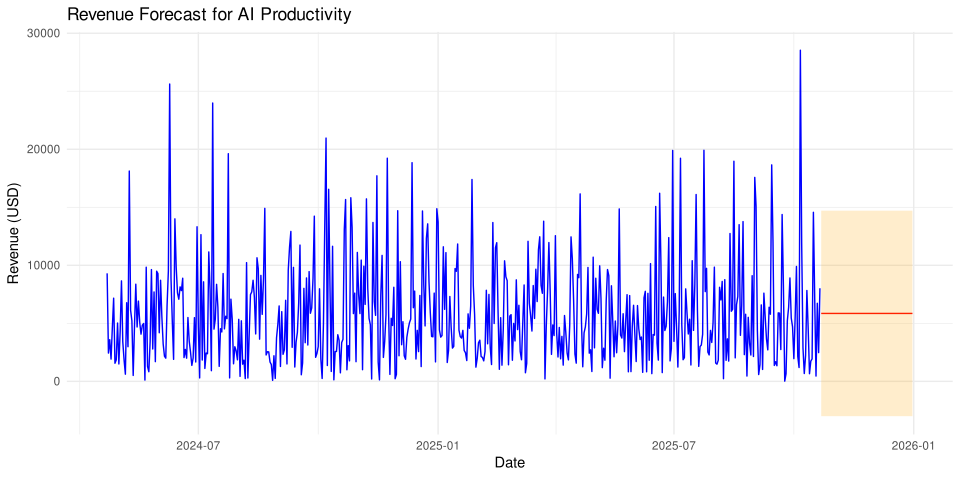
Plot the results for a sample category

library(ggplot2)

sample_category <- "AI Productivity"
df_plot <- output |> filter(category == sample_category)
ggplot(df_plot, aes(x = Date)) +
  geom_line(aes(y = actual), color = "blue") +
  geom_line(aes(y = forecast), color = "red") +
  geom_ribbon(aes(ymin = lower95, ymax = upper95), alpha = 0.2, fill = "orange") +
  labs(
    title = paste("Revenue Forecast for", sample_category),
    y = "Revenue (USD)",
    x = "Date"
  ) +
  theme_minimal()
Figure 3

5 References